Dev Update: Iterating Systems
Always concentrate on how much you've implemented, rather than on what you still have left to do
Some time later after the release of v0.24 I decided to sit down and review the game roadmap to adjust my priorities and see if there any other flight or spacecraft systems need to be implemented other than the part stress system I mentioned a year ago. Honestly, I was surprised that there were not many tasks left. Most of them were related to content, like science, resources, contracts and spaceport building. But I found some of them that were important to the sandbox to be considered complete.
Keeping up with the progress
I updated my PC in September after the previous one suddenly stopped booting up. I launched Rocket Science and found that it performs at more that 200 FPS in almost every scene. It’s been a long time since the game was released in early access, so it’s likely that most players have upgraded their systems in some way too. This meant I had more room for performance intensive systems as well as for some graphics improvements. But the game was still developed on Unity 2022. After a very painful engine update last time when I spent almost a full dev cycle fixing and reporting engine bugs, I didn’t want to try that again and lose three or more months because Unity QA could not do their job properly. But I’ve heard from several sources that Unity 6.0 was pretty good, because it was in development for two years and got a considerable stabilization and bugfixing period.
I decided to give it a try and… The update process was surprisingly not that painful. It took only a week of work and I encountered almost no critical and unsolvable bugs. Performance took a little hit as always with each new Unity version (around a few FPS), but most importantly there were a bunch of improvements I waited for so long.
The first one was an atmosphere improvement. Since the beginning of the Rocket Science development I needed to introduce dozens of fixes into source code of HDRP so the game could support atmospheric scattering and proper coloring of atmosphere itself. So even a patch version engine update was not that pleasant because of it. But now only one bug needs to be fixed in source code! Moreover, some artifacts were no longer present. Here is how atmosphere looked at low sun angles before.
 Around this altitude the sky went suddenly dark and you could notice artifacts on the horizon line
Here is how it looks with the new atmosphere rendering.
 Artifacts are gone the transition is smooth
Other ones were better implementations of TAA and dynamic exposure. TAA is mostly used in the spaceport and rocket assembly, while during the flight SMAA is used. TAA becomes much less blurry and far more stable.
While working on this I also found out the reason why SSGI produced insane ghosting and looked completely broken. I fixed this issue and re-enabled the effect. It is still very subtle and very expensive to render, so I recommend trying it only on high end systems. The fix also made SSR better, so this is two birds with one stone.
This was all great, but there was one system that made me decide to update in the first place.
Water
Some time ago Unity introduced a water system into HDRP that approximately modeled a volumetric water medium, and includes properties to render effects such as caustics, scattering, and refraction.
 This is what Unity Technologies promised us in Unity 6
Not only that, but it also supports wind and current, underwater rendering, foam and surface overriding. The last one means that you can dynamically make waves smaller near the shores and bigger in the deep sea. And most importantly, it was integrated directly into the rendering pipeline. Other rendering systems know about water existence and account for that. And lastly, this was a good foundation to make rivers in the future. Sounds amazing! Can you guess what I need to do, to integrate it as an ocean into Rocket Science?
 Well, how I would tell you…
Well, this is not that simple. The developers from Unity Technologies have never considered that their engine could be used for space simulators. So the first assumption they made is that there is an “up” direction that is aligned with the Y-axis of the coordinate system. As you can imagine, there is no such concept in space sims. So the water will just break if you try to look at it from any other direction. When I brought up this problem on the forum, the developers wrote that they will not consider space sims in the development of the water system.
Fine. While this is definitely a problem, I could solve it. Remember I told you about the floating origin system that I introduced in the beginning of the development to solve floating point issues? It keeps spacecraft near the scene origin by moving the whole world around it. You can also perform this trick with the rotation. So you can rotate the whole world including spacecraft so the y-axis would point in an up direction. While this solution is pretty simple, there are a lot of places in the code that use non-transformed rotation and I had to find all these places and fix it.
 This the only one of the many rotation bugs that I’ve fixed
But this was only the beginning of the journey. Spherical water was not supported. There were basically only two options: infinite flat plane and custom meshes.I was glad that they at least provided custom meshes, because I had already generated the ocean separately from the planet surface. But when I looked up the API there was no support for the ECS system. You should provide the list of GameObject with mesh renderers to the system which I didn’t have and it would be very expensive to create them. When I brought up this problem on the forum the Unity developer told me they have no plans to support ECS at that moment.
Fine. Probably I could just use ocean material, apply it to my meshes and that will be enough? Nope. The ocean simply becomes invisible if you do that. So the only way to render the ocean is to use Unity API which does not support the technology they themselves created and have constantly promoted since 2018.
All right, It was time to dig into source code. After spending a week digging through I was stunned. It was one of the most unnecessary overcomplicated systems Unity have ever implemented. It also didn’t follow any traditional workflows that were established in the engine this why I constantly encounter different problems on the way. And finally, not a single attempt was made to make it extensible in any way beyond the basic scenario.
Nevermind. I added support for ECS meshes and could finally run the game and see how it looked. It was good.
 Ocean waves was as good as in the previous ocean, but colors were much better
 Here you can see how light scatters near the tips of the big waves
 It is possible to view water surfaces from below
 Caustics simulation. It is complex light patterns formed by refraction or reflection off curved water surfaces
But when I fired the engines, something was very wrong.
 It is harder to spot the problem on a small gif, but it was obvious on the full screen
Did you see it? It felt like the spacecraft was stuck in one place. Turns out for some stupid reason all calculations for waves generation and displaying for custom meshes was made in world space. But because of floating origin the spacecraft always stay near scene origin. And it doesn’t matter that the water surface moves relative to the spacecraft – waves are stuck in one place, since spacecraft is not moving through the scene in a traditional way.
This was the point when I almost gave up. It felt like Unity developers made as many roadblocks as possible to force everyone to use their systems one way only. But I was so deep in this rabbit hole already so I didn’t want to turn back yet. More research, digging and fixing in the source code and it was finally working.
 Now you can compare with the gif above and see how bad it was
After all that suffering the journey was far from over. Ocean surface artifacts like dots visible from space have returned. It happens because of floating point precision on such scales and distances. I fixed this bug several years ago by adding an ocean to planet surface distance check. But there was no way to change water transparency in the custom shader and no way to pass required data to calculate it. The solution: write a custom shader that matches the look of the ocean as close as possible, implement distance cutoff and apply it to the ocean quads when they are far away from the camera.
Now I reached the feature parity with the old ocean system. I decided to stop there for now and bring it in the next update. If there will be no major problems and it will perform well in general, then I will proceed with development and bring more features, like surface overriding, that I described above.
But this was only the rendering side of the water. I felt like this was a time to finally touch the physics side.
Buoyancy
Statistically most suborbital flights and Earth returns will end up in the ocean,, because it covers more than 70% of the surface. And current flat collider implementation isn’t the best way to immerse players. But I didn’t want to fake buoyancy just for the sake of the splash effect. I wanted it to be a full-fledged system, like an atmosphere that could generate interesting situations and provide another dimension for flights.
I’ve started my work by adding an ocean to the space flight model. You will probably be surprised but the water surface was only a visual entity before. That’s why spacecraft couldn’t interact with it. So what is this model? Any planet can have an ocean. It returns the liquid surface height relative to the planet’s radius. If the spacecraft is below this height it returns current liquid density and temperature at point. I’ve implemented this model for Earth ocean and added simplified approximations of ocean density and temperature depending on depth. The surface temperature is constant for now and equals 20° C, but in the future it should obviously depend on latitude and the climate model.
Knowing these two parameters is enough to finally start experimenting with buoyancy. The formula is pretty simple:
\[\begin{equation} F_{a} = \rho gV \end{equation}\]This is the force that will counteract gravity. The only difficult part here is to find a part volume that is currently under the water. When the whole part is under the water it is easy – I already have a volume for any part that I use for thermodynamics. But what to do if the part submerged partially?
For the first iteration I decided to approximate the submerged volume by sphere-plane intersection. Assume that every part is the sphere and if it intersects with the water surface plane, then we could easily find the volume below the intersection. Let’s now place a command pod on the ocean floor and see how it will behave.

What even happened there? Command pod was shot from the water with the increasing speed like it had a good engine. And fall back into water looks wrong too:

Ah, this is because I didn’t account for water friction force. The good news is that it is very similar to air drag. The bad news is:

It completely stops the craft on contact like it crashed into a collider. But why is that? I used the same calculations for air that are proven by the time. But it turns out that gases behave very differently from liquids when the speed of the object increases. While in gasses the drag coefficient increases.
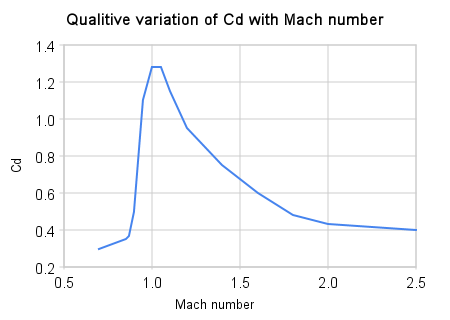 This is how drag coefficient behaves in the air
 This is how drag coefficient behaves in the water
Here we go, more math and physics, yay! There is no direct way to calculate drag coefficient dependency on just speed. As you can see from the graphs I need to calculate Reynolds number as well as dynamic viscosity, characteristics length and the way to approximate those Cd reduction curves.
Several days on the line and below is a result.

This already looks not that bad but definitely needs improvement. One of the ways to make buoyancy feel real is to split submerged mesh into voxels and then to calculate the submerged volume of each voxel separately. Here we are stepping into slippery territory. Rocket Science has rocket parts that have a volume of hundreds cubic meters. If I choose a fixed size voxel with a volume of 0.1 cubic meter (which is already big) then such big parts will require a heavy calculation of 1000+ voxels. Multiplying on typical 100+ parts in the rocket and the performance will degrade significantly.
I’ve implemented an algorithm that splits rocket parts into dynamically-sized voxels, so each part has around the same amount of them. For better precision I approximate the mesh volume in each voxel when it fills only part of it. Here is an example of how it looks on the command module.
 Voxels of the command module. The reg-green gradient means how much volume mesh occupies in each voxel
I also moved voxel splitting step, volume and area calculations into rocket part baking on the game start. This will reduce the part configuration time and will help modders to add their parts in the future.
There are three more steps I need to do before the buoyancy system will be complete. The first one is to make the part to react to the waves and current flow. It sounds hard, but the water system has an API to query a water height at specified positions, so this is a good start already. The second one is thermodynamics which is completely different in the water compared to everything I’ve done so far. The last one is to put everything together. For example if the part is moving in the water it should not apply the air drag forces. Or because the spacecraft in the water is constantly moving I can’t just put it to sleep and move out of physics simulation. I need to account for all those things too.
As always, I’ve experimented with more new and shiny things in the last version of Unity and HDRP. Some of these features are promising but it is very early to show them. Also I’ve heard that Unity has stopped HDRP development and fired the whole team who developed it. Although it is terrible news for the Unity community this means that I no longer need to update the engine in the future and can start to heavily modify HDRP for the game needs. And I feel like 6.0 was the last engine version that was not yet AI slopified.
That’s all for today, thank you for your support and patience. See you in the v0.25 update!